Qyvandra
Flux Deck
Flux Deck
Couldn't load pickup availability
1. Problem Statement
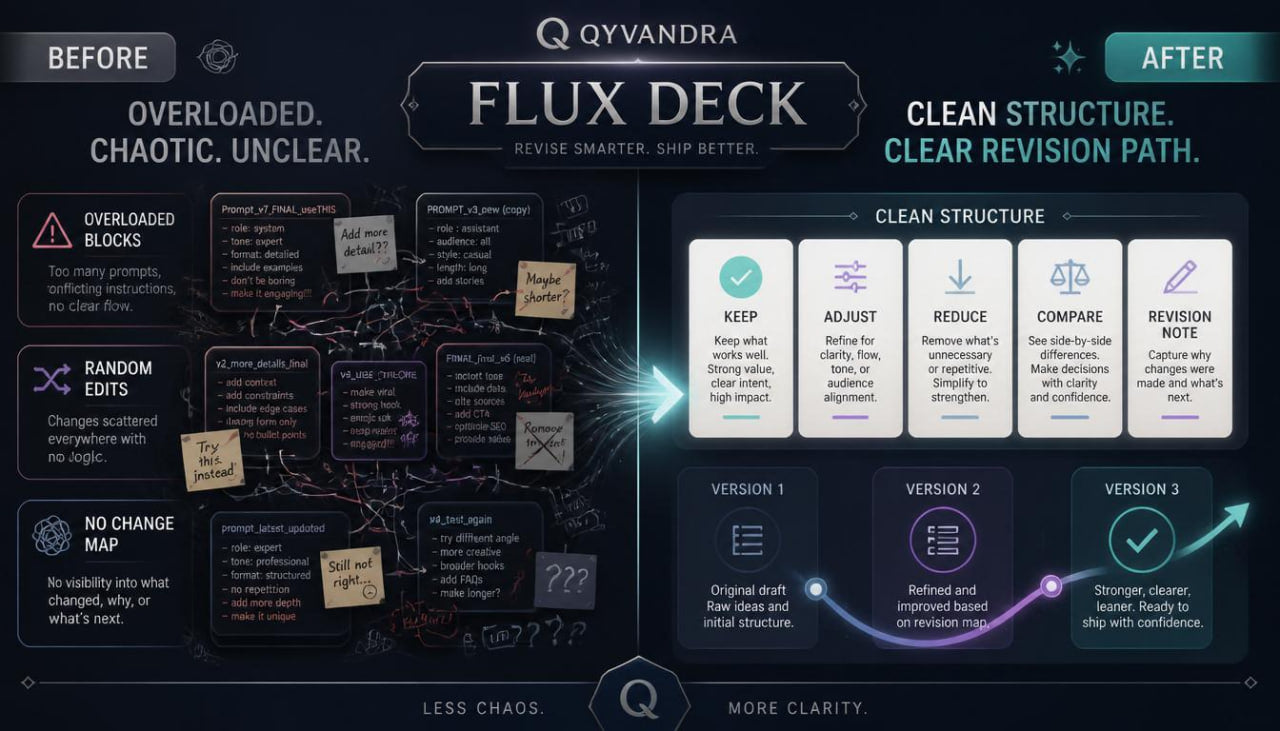
At the middle stage of learning, a designer may already know how to describe an idea, build a series of variations, and analyze composition, but change management often becomes difficult. The first visual direction may feel interesting, the second may be more expressive, and the third may have a clearer composition, yet without a system it can be hard to decide which route to take next. A learner may move from one variation to another without recording what actually changed: style, rhythm, color, scale, background, detail level, or general mood. Because of this, revision becomes random, and learning notes get lost between separate attempts. For AI in design, it is important to view change as a guided process rather than a group of unrelated results.
2. Solution
Flux Deck helps the learner work with variation in a more structured way. This tier explains how to track changes between visual directions, compare them through specific parameters, and make reasoned choices during revision. The materials are built around the idea of “flow”: an idea moves from the first description to several variations, then through analysis, clarification, and another edit. The learner studies not only the final look, but also the path through which the idea changed. This approach helps organize creative tasks, create learning notes, and work with AI-based design methods without chaotic jumps.
3. What’s Inside
Flux Deck includes a series of modules that teach work with change, variation, and revision of design directions. The first section introduces the idea of creative flow. The learner studies an idea not as a fixed object, but as material that can shift through style, composition, detail, color, space, and tone. This module explains why it is important to record every change instead of simply creating new variations without analysis.
The second section focuses on a change map. The learner practices writing down which exact parameters changed between the first, second, and third version. For example, in the first variation the composition may be central, in the second it may be asymmetrical, and in the third it may become more spatial. Color can move from a cool palette to a soft warm range, while detail can move from dense to restrained. This map helps the learner see movement logic rather than just a group of different results.
The third section explains how to build a variation description. The learner takes one base description and creates several edits, changing only selected parts. For example, the theme and main object stay the same, while rhythm of details, lighting, depth of space, or background character changes. Through this, the learner better understands which words influence the overall look and which words barely shift the direction.
The fourth section focuses on comparing versions. The learner receives an evaluation table where every variation is reviewed through parameters: idea clarity, composition cohesion, mood match, space use, detail balance, color logic, and room for further revision. This kind of analysis helps choose a direction not by random impression, but by structural traits.
The fifth section is devoted to revision through reduction. Often a design task becomes clearer not by adding new details, but through careful removal. The learner studies how to remove extra words from a description, reduce the number of visual elements, clarify the main accent, and keep only the parameters that support the core idea. This module includes exercises where the learner takes an overloaded description and makes it shorter, clearer, and more cohesive.
The sixth section explores revision through expansion. Sometimes the first description is too broad, so it needs more detail to shape a distinct direction. The learner practices adding specificity: type of space, line character, material feel, interaction between light and shape, scene mood, distance to the object, and contrast level. The important point is that added detail does not become overload, but works as precise adjustment.
The seventh section contains the exercise “three changes — one idea.” The learner chooses one theme and creates three variations, changing only one main parameter each time: composition, color, or detail level. After that, the learner compares the results and writes which change had the strongest effect on the character of the work. This exercise helps build understanding of cause and effect inside the design process.
The eighth section is a working decision deck. It includes cards for analysis: “keep,” “clarify,” “remove,” “change scale,” “review background,” “strengthen pause,” “reduce detail,” and “keep mood.” The learner uses these cards as prompts during revision to stay oriented between variations.
The ninth section helps create a final note after a revision series. The learner describes which variation became the working base, which changes were useful, which added unnecessary complexity, and what should be considered in the next task. This note forms a learning archive that can be revisited during later Qyvandra tiers.
4. Who Is This For?
Flux Deck is suitable for learners who already have basic practice with AI-based design and want to manage changes between variations more carefully. This tier is useful for designers, illustrators, visual series creators, creative students, and anyone working with concepts, mood directions, composition studies, and training sketches. It especially fits those who often create many variations but do not always understand how to choose the next direction for revision. The materials are not tied to specific services or third-party program names. The main focus is thinking, analysis, work with parameters, and consistent revision of creative tasks.
5. What You’ll Learn
- How to track changes between several visual variations.
- How to create a change map for a design task.
- How to revise a description by reducing extra details.
- How to add specificity without overloading the creative direction.
- How to compare versions by color, composition, mood, and space.
- How to see which parameter has the strongest effect on the result.
- How to work with a variation description based on one theme.
- How to use decision cards during revision.
- How to create a final note after a series of edits.
- How to prepare for the next Qyvandra tier, where work moves into more developed creative plans.
6. Purchase Terms
Flux Deck includes a 30-day refund option according to the store terms. The learner can review the materials, study the tier structure, and submit a refund request within the defined period if the format does not match their learning needs. Qyvandra presents this tier as a learning course for developing analysis skills, working with change, and revising design tasks in a consistent way. We do not use inflated claims, pressure-based wording, or state the same outcomes for every learner. The materials are intended for careful study, independent practice, and better organization of the creative process.
Self-paced learning overview
- 📁 Digital file available after purchase
- 🗂️ Long-term availability
- 🔒 Secure checkout
- 🗓️ Content updated in 2026
Are the courses suitable for beginners in design and AI?
Are the courses suitable for beginners in design and AI?
Yes, the materials are built step by step. Each tier has its own depth, so learners can start with basic topics and gradually move toward more detailed tasks.
Do I need technical background?
Do I need technical background?
No, the focus is on design thinking, idea development, composition, visual logic, and AI-based approaches without naming specific programs.
Can I study at my own pace?
Can I study at my own pace?
Yes, the materials are created for independent learning. You can return to topics, exercises, and examples whenever it suits your study rhythm.
Share