Qyvandra
Cloud Capsule
Cloud Capsule
Couldn't load pickup availability
1. Problem Statement
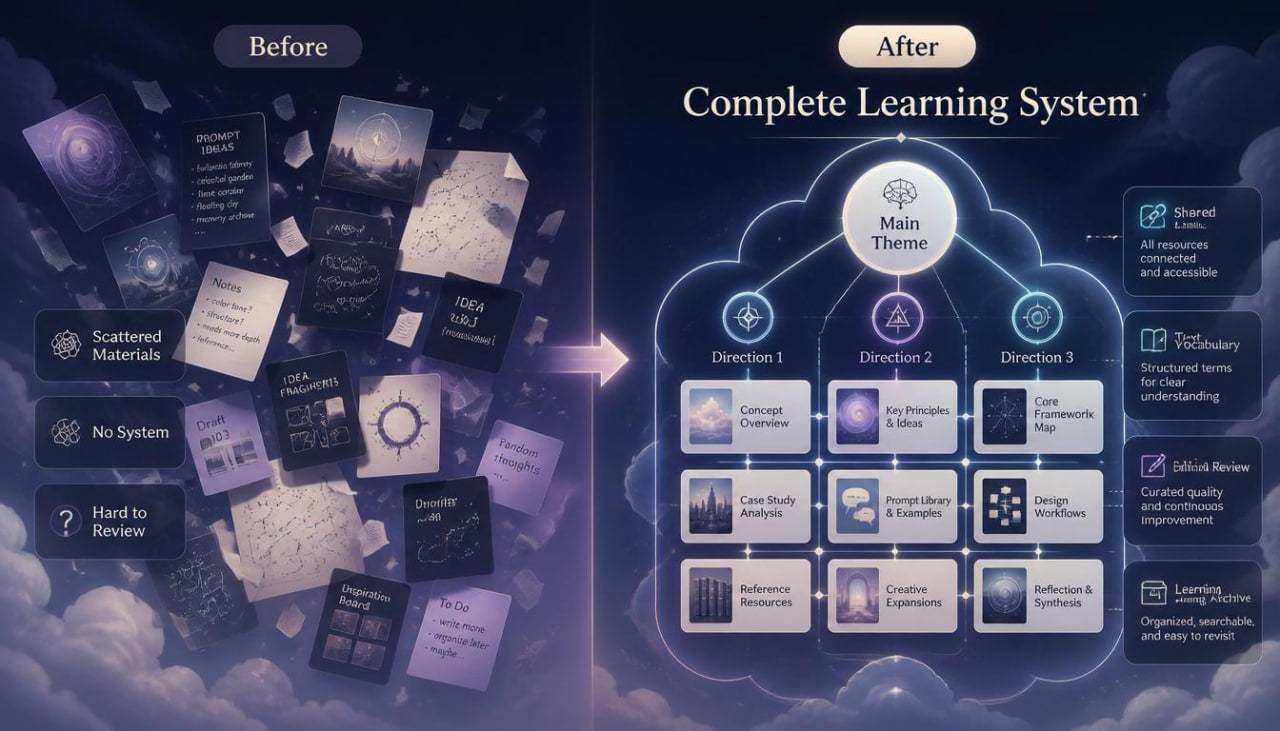
When the learner completes the earlier Qyvandra stages, they already have a set of skills for working with ideas, descriptions, composition, series, capsules, and editorial analysis. Yet at the final level, a new challenge appears: how to connect all these actions into a broad system that can be used for different creative tasks. Separate exercises may feel clear, but without a general structure, it can be difficult to see how they support one another. It is also important to learn how to keep results, notes, comparisons, and revisions so they become a learning archive rather than scattered files. This is why Cloud Capsule focuses on a full cycle: from an idea to an organized series of materials and final analysis.
2. Solution
Cloud Capsule helps the learner build a broad learning system for AI design. This tier shows how to choose a theme, create a brief, form several directions, gather them into a capsule, align them with each other, and prepare an editorial summary. The materials explain how to work not only with separate elements, but with the whole creative structure: from the first description to the final observation map. The learner studies links between ideas, color, shape, space, composition, and written descriptions. This format helps organize layered learning tasks and shape a personal approach to working with AI in design.
3. What’s Inside
Cloud Capsule includes an expanded set of modules that connects earlier Qyvandra topics into one broad practice. The first section explains the idea of a cloud capsule. It is not one series and not one set, but a learning system where several related directions are kept inside a shared structure. The learner studies how one broad theme can contain several subthemes, different composition choices, separate visual roles, and several levels of revision.
The second section focuses on choosing the main theme. At this stage, the theme needs to be broad enough for several creative directions, but not so vague that the logic becomes unclear. For example, the learner may work with themes such as abstract design for educational identity, a series of visual metaphors, modular shapes for digital branding, color studies for creative posters, or a set of composition scenes. The materials explain how to check the theme with three questions: whether it has a central idea, whether it can create several subdirections, and whether it can be described through visual parameters.
The third section focuses on the main brief. The learner creates a document that records the theme, learning purpose, mood, audience, visual boundaries, shape types, color logic, composition rules, possible subdirections, and evaluation criteria. This brief becomes the base for the whole work. It helps the learner stay oriented while creating several series and shows which elements should remain stable.
The fourth section explains how to build subdirections. The learner divides the broad theme into several lines. For example, one line may explore soft shapes, another may explore geometric structure, a third may explore space, and a fourth may explore color accent. For each line, the learner creates a short description, visual rules, composition scheme, and a list of variable parameters. This helps guide a large theme without confusion.
The fifth section is devoted to series inside the cloud capsule. The learner studies how each subdirection can have its own mini-series: three or five materials that explore one idea through different scales, compositions, rhythms, or color choices. The important point here is to see not only the separate series, but also its place in the whole system. Each series should support the main theme while keeping its own character.
The sixth section explores links between subdirections. The learner analyzes what connects different parts of the capsule: shared color, repeated shape, similar space, a unified pace of details, close mood, or repeated composition idea. Then the learner defines which parameters may differ. This work helps keep the system cohesive without excessive repetition.
The seventh section focuses on written structure. The learner creates a shared vocabulary for the full capsule: words for mood, space, shape, color, light, rhythm, material feel, and composition. This vocabulary is then used to create descriptions for separate subdirections. The materials show how writing can support visual unity and help during revision.
The eighth section contains a large practical exercise: “theme — three lines — nine materials.” The learner chooses one theme, divides it into three subdirections, and creates three related tasks for each one. After that, all nine materials are compared through criteria: theme, mood, color, composition, rhythm, space, role in the system, and level of alignment.
The ninth section is devoted to editorial review. The learner reviews the full capsule and defines which materials support the general structure, which need clarification, and which should be replaced. The review works through a map: central theme, subdirections, shared traits, variable parameters, color rules, composition points, written vocabulary, and revision list.
The tenth section explains how to form a learning archive. The learner gathers briefs, descriptions, maps, notes, comparisons, and conclusions into one system. This helps show the learner’s study path: which choices repeated, which techniques worked better for specific tasks, which themes need additional practice, and which descriptions were too broad or overloaded.
The eleventh section closes the tier with the Cloud Capsule final map. In it, the learner describes the whole system: main theme, three subdirections, role of each series, shared visual traits, editorial revisions, and final observations. This map becomes a base for further independent practice with AI design.
4. Who Is This For?
Cloud Capsule is suitable for learners who already have experience with earlier Qyvandra tiers or have a clear understanding of AI design basics, composition, serial thinking, and revision. This tier is useful for designers, illustrators, visual concept creators, creative students, and those who want to work with large learning systems. It also fits learners who create many related materials and want to organize them through briefs, maps, series, subdirections, and final notes. The materials are not tied to third-party services or program names. The main focus is structure, system thinking, editorial analysis, and organization of creative practice.
5. What You’ll Learn
- How to build a broad learning system for AI design.
- How to choose a theme for several related subdirections.
- How to create a main brief for a large creative task.
- How to divide a theme into several series with their own roles.
- How to keep connection between subdirections through color, shape, rhythm, and space.
- How to create a written vocabulary for the full capsule.
- How to compare nine or more materials through one system.
- How to conduct an editorial review of a large set.
- How to form a learning archive from briefs, descriptions, maps, and notes.
- How to create a final map for further independent practice.
6. Purchase Terms
Cloud Capsule includes a 30-day refund option according to the store terms. The learner can review the materials, study the tier structure, and submit a refund request within the defined period if the format does not match their learning needs. Qyvandra presents this tier as a learning course for developing system planning skills, editorial analysis, and organization of AI design materials. We do not use inflated claims, pressure-based wording, or state the same outcomes for every learner. The materials are intended for careful study, independent practice, and better organization of layered creative tasks.
Self-paced learning overview
- 📁 Digital file available after purchase
- 🗂️ Long-term availability
- 🔒 Secure checkout
- 🗓️ Content updated in 2026
Are the courses suitable for beginners in design and AI?
Are the courses suitable for beginners in design and AI?
Yes, the materials are built step by step. Each tier has its own depth, so learners can start with basic topics and gradually move toward more detailed tasks.
Do I need technical background?
Do I need technical background?
No, the focus is on design thinking, idea development, composition, visual logic, and AI-based approaches without naming specific programs.
Can I study at my own pace?
Can I study at my own pace?
Yes, the materials are created for independent learning. You can return to topics, exercises, and examples whenever it suits your study rhythm.
Share